PDF escaneado a EPUB, sin convertir a ciegas

Convierte libros escaneados en un EPUB legible antes de pagar la conversión completa.

Sube un PDF escaneado, genera una vista previa EPUB real de las primeras 10 páginas y decide si merece una conversión completa antes de invertir más tiempo en limpiarlo.

Direct answer

What is a scanned PDF to EPUB converter?

A scanned PDF to EPUB converter turns an image-based PDF book into a reflowable EPUB. Scanned PDF to EPUB focuses on a preview-first path: upload one PDF, generate an EPUB preview from the first 10 pages, then check OCR and layout risk before a full-book conversion.

  • Input: one scanned PDF up to 64 MB.
  • Output: a downloadable EPUB preview from the first 10 pages.
  • Quality checks: empty OCR, page-number leaks, broken hyphenation, spacing damage, and formula/layout risk.
  • Best fit: scanned books, public-domain archives, academic PDFs, Kindle and Kobo reading workflows.

  • Sube un PDF
  • Vista previa de 10 páginas
  • Revisa el riesgo OCR antes de convertir
  • Compara ejemplos antes y después

Sube un PDF escaneado. Obtén una vista previa EPUB.

Suelta un PDF escaneado, revisa las primeras 10 páginas como EPUB y detente pronto si el escaneo no merece una conversión completa.

Prueba la demo

Elige un PDF escaneado y genera la vista previa ahora.

Esta demo local empaqueta solo las primeras 10 páginas. Si los títulos, los saltos de línea o las fórmulas siguen rotos, puedes detenerte aquí antes de lanzar un trabajo mayor.

  • Hasta 64 MB
  • Primeras 10 páginas
  • Descarga el EPUB de vista previa

Elige un PDF arriba y luego genera la vista previa EPUB.

Opcional: inspecciona primero el texto extraído

La mayoría de la gente debería empezar con la subida del PDF. Abre esto solo si necesitas revisar el texto extraído línea por línea antes de convertir.

Usa esto solo si quieres inspeccionar manualmente una sola página extraída. La ruta principal sigue siendo la subida del PDF.

Resultado

Requiere revisión

Ver informe completo

Puntuación total

55/100

Problemas detectados

3

Por revisar

2

Crítico

0

Guion roto

Se detecto una guionizacion rota.

revisar

Riesgo en estructura de formulas

Se detecto texto con aspecto de formula; revisa la estrategia de renderizado.

revisar

Fuga de numero de pagina

La ultima linea parece un numero de pagina.

auto

Tres pasos. Una decisión.

El producto actual no es una canalización editorial completa. Primero responde una pregunta: ¿puede este PDF escaneado convertirse en un EPUB legible sin perder más tiempo?

1

Sube

Elige un PDF escaneado y genera una vista previa EPUB corta desde las primeras páginas.

2

Lee

Abre la vista previa y comprueba si saltos de línea, títulos, fórmulas y pies de figura siguen siendo legibles.

3

Decide

Sigue con la conversión completa, repara el origen o detente antes de gastar más esfuerzo en un mal escaneo.

Lo que los lectores siguen encontrando

Las mismas cuatro quejas aparecen una y otra vez.

En Reddit, en hilos de Calibre y en foros de e-readers, los lectores de libros escaneados repiten las mismas frustraciones. La vista previa existe para responderlas antes de comprometerte con una conversión completa.

01

Se queda atascado al 1% o exporta imágenes en vez de texto.

Muchos PDF escaneados son solo fotos de páginas. Sin una capa de texto útil, los convertidores se bloquean, inflan el archivo o incrustan cada página como imagen.

02

El PDF es buscable, pero el EPUB sigue viéndose mal.

Las capas OCR ocultas suelen traer guiones rotos, comillas incorrectas, símbolos extraños y saltos de línea que sirven para buscar, pero fallan al reflujo.

03

Tablas, fórmulas, pies de figura y columnas se rompen.

Los artículos científicos y las revistas antiguas pierden el orden de lectura muy rápido. Las columnas, la matemática y los pies de figura son donde se rompe la confianza.

04

El PDF fue hecho para imprimir, no para una pantalla de 6 pulgadas.

Incluso cuando el PDF abre, leer en pantalla pequeña suele convertirse en acercar, mover, recortar y repetir. El usuario quiere saber si el reflujo realmente será legible.

Ejemplos de PDF escaneado a EPUB, antes y después.

Estos ejemplos hacen lo que la copia no puede: mostrar cómo se ven distintos PDF escaneados antes de convertir y qué debe conservar una vista previa EPUB creíble.
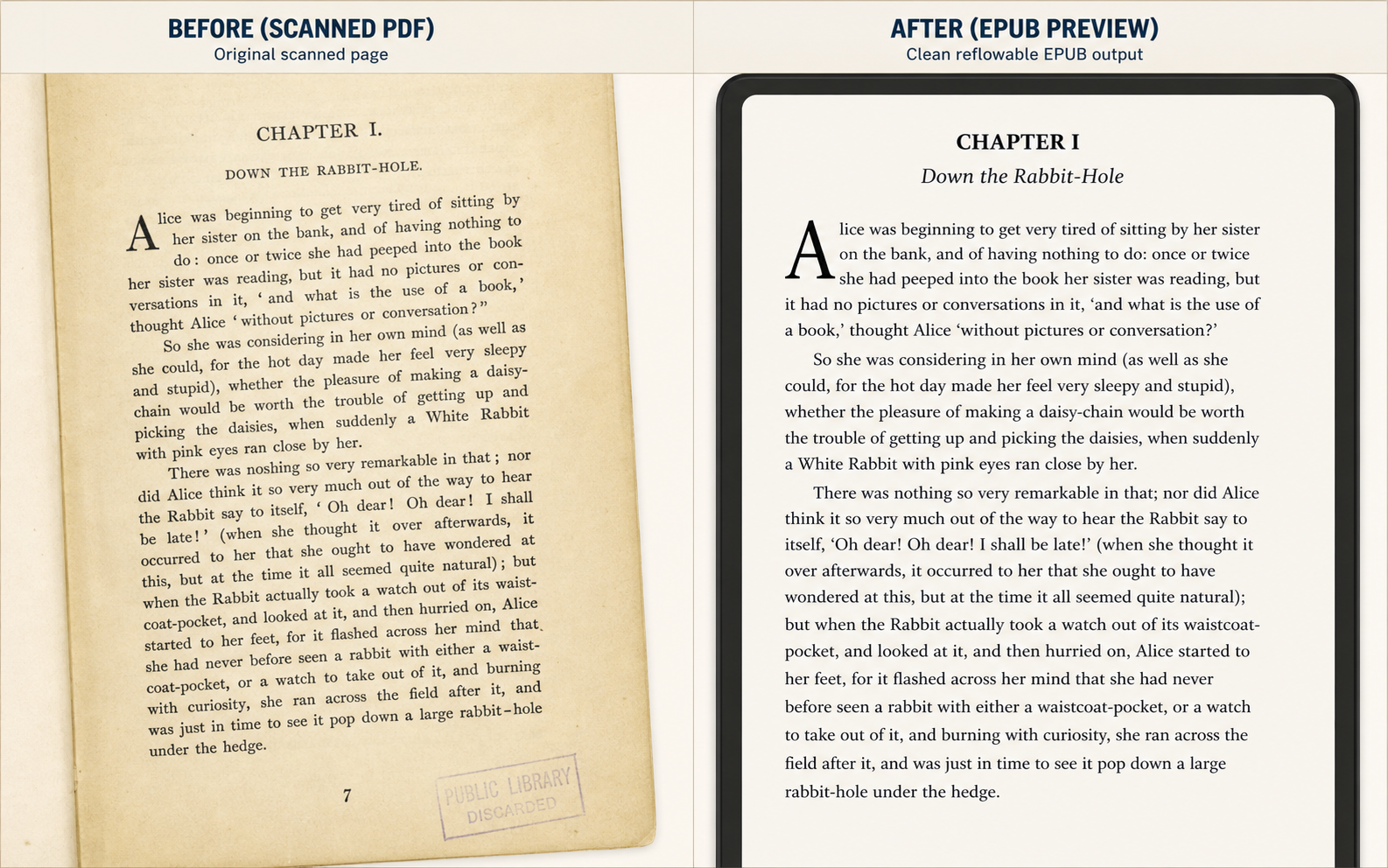
Before and after scanned PDF to EPUB example for a historical novel page, showing a yellowed book scan on the left and a clean reflowable EPUB preview on the right
Historical novel scan to EPUB preview: damaged paper scan on the left, clean reflowable reading view on the right.

Use Case 1

Public-domain book chapters

This is the simplest but highest-volume use case: judge whether a yellowed chapter scan becomes comfortable enough to read on a small e-reader.

  • Page numbers removed
  • Broken lines repaired
  • Reading comfort improved
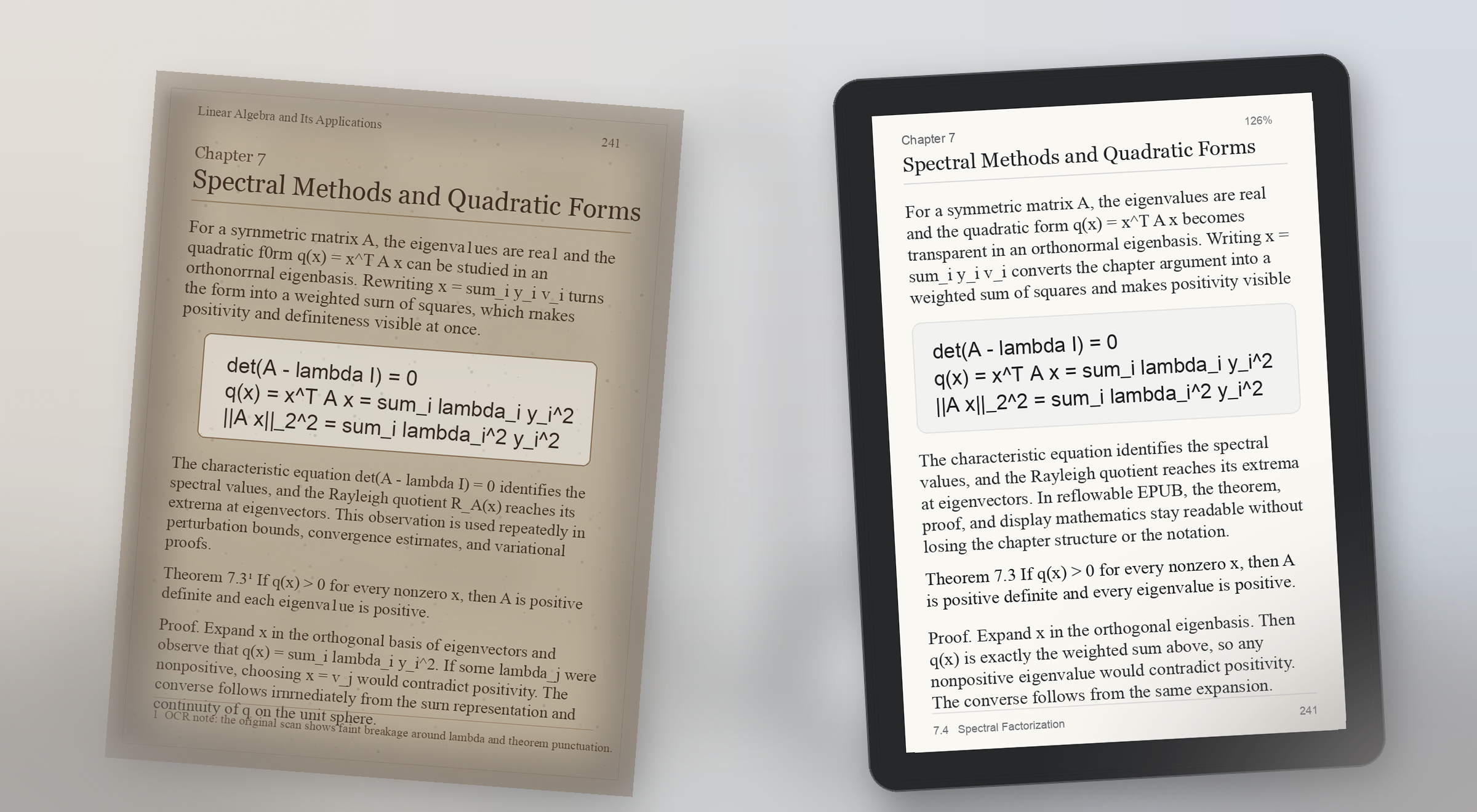
Before and after scanned PDF to EPUB example for a math-heavy textbook page, showing a faded printed page with formulas on the left and a readable EPUB preview with preserved display math on the right
Math-heavy textbook preview: scanned formulas stay visible on the left, and the EPUB proof keeps theorem structure and display math readable on the right.

Use Case 2

Math-heavy textbook PDF to EPUB

Formula pages break trust fast. A useful preview proves that equations, theorem blocks, and surrounding explanation still make sense on a real reading device.

  • Display math preserved
  • Theorem blocks readable
  • Small-screen proof check
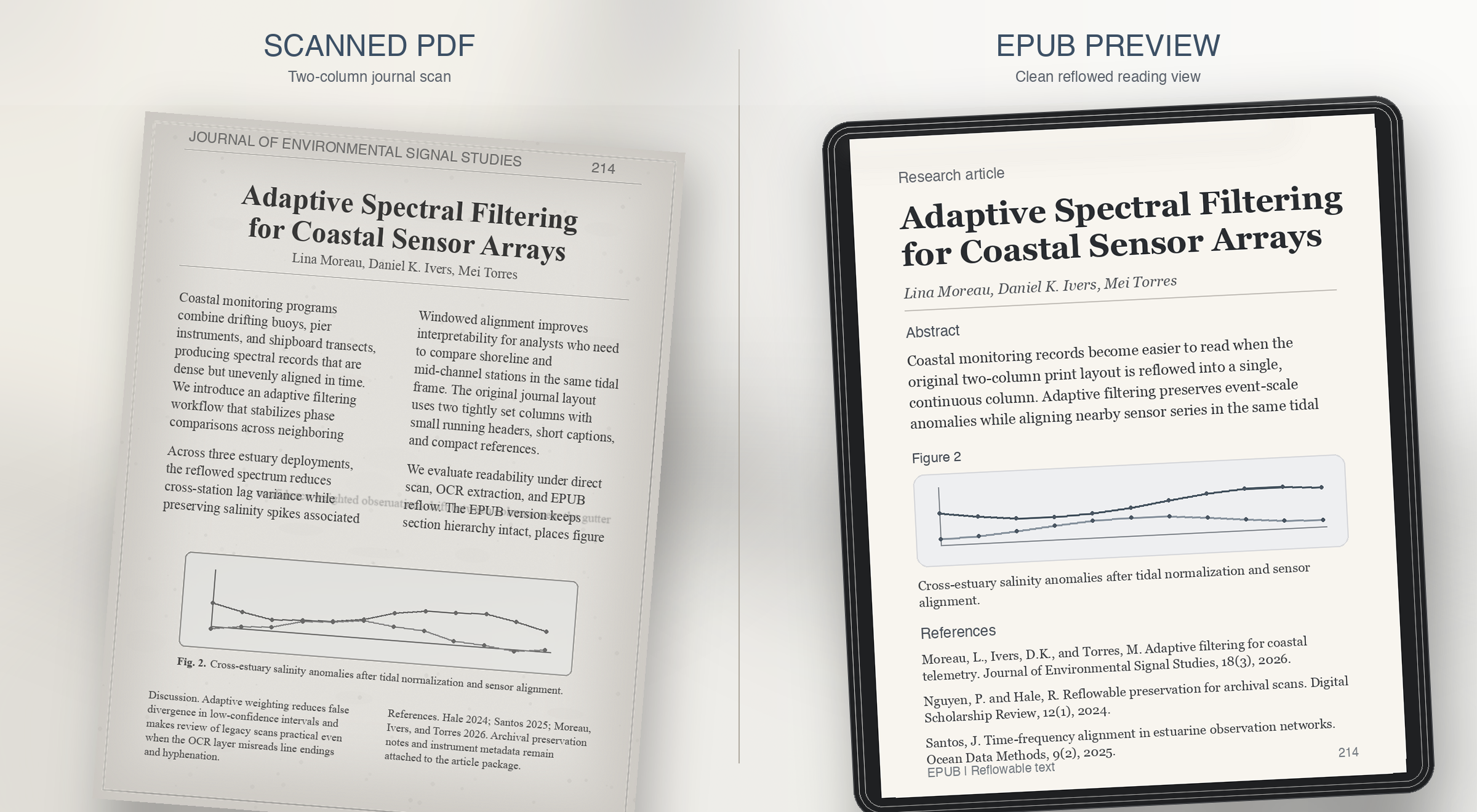
Before and after scanned PDF to EPUB example for a two-column journal article, showing a grayscale academic scan on the left and a clean single-column EPUB preview on the right
Two-column journal preview: dense print on the left, a single readable column with figure captions and references restored on the right.

Use Case 3

Two-column journal article to EPUB

Research journals usually fail on reading order. The preview should prove that columns, captions, and references survive reflow instead of collapsing together.

  • Column order resolved
  • Figure captions restored
  • References kept readable
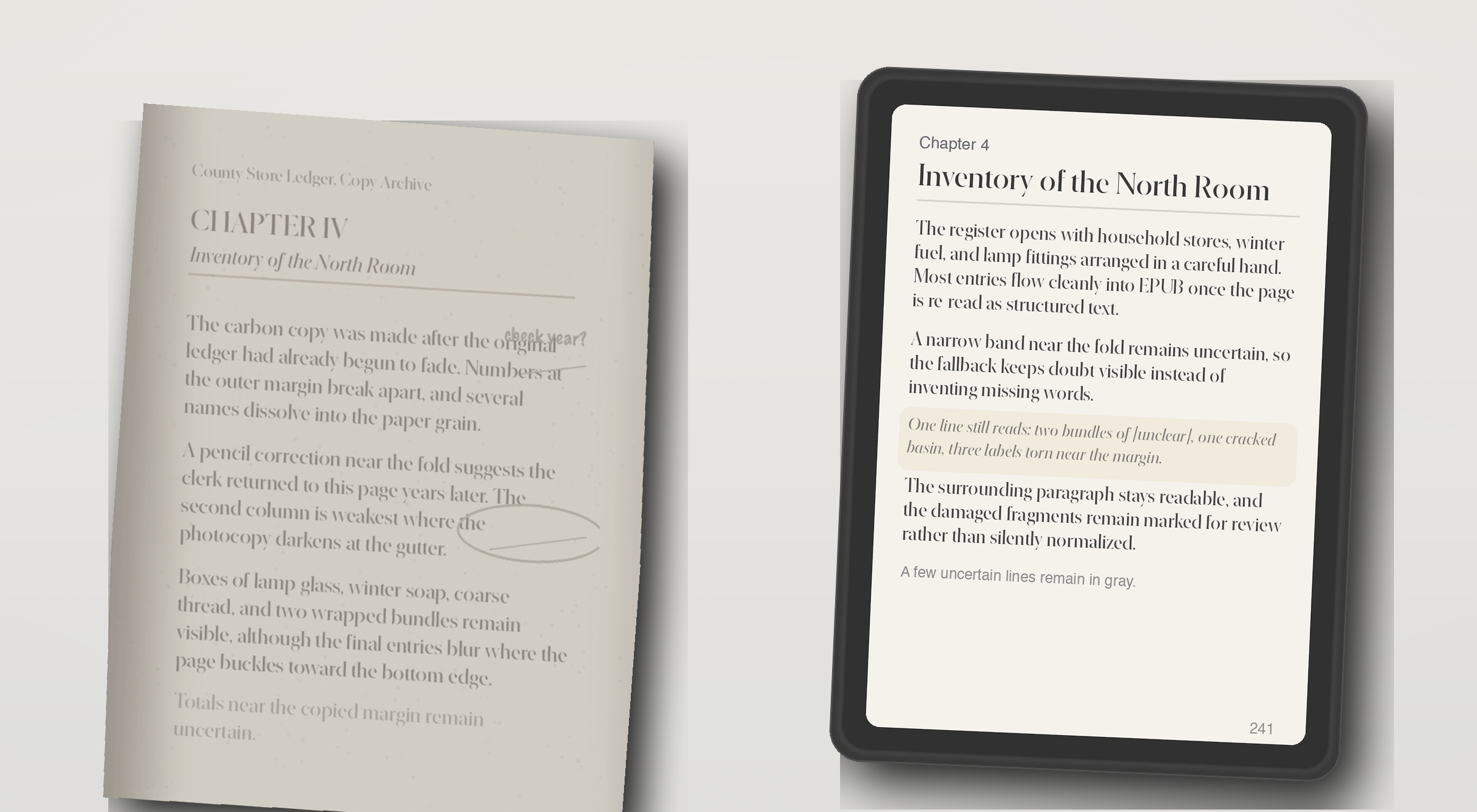
Before and after scanned PDF to EPUB example for an image-only archive scan, showing a faded photocopy on the left and an EPUB preview with partially recovered text on the right
OCR fallback preview: a weak archive photocopy on the left, and recovered but still honest EPUB text on the right.

Use Case 4

Image-only scan with OCR fallback

Some PDFs have no usable text layer at all. The right behavior is not fake confidence, but a preview that shows what OCR recovered and what still needs review.

  • Weak scan recovered
  • Unclear lines still visible
  • Review still required

Preguntas que la gente hace antes de confiar en un convertidor de libros escaneados.

What does the live demo check today?

The live checker runs the repo's quality rules against extracted page text. It flags empty OCR output, page-number leaks, broken hyphenation, bad spacing, and formula-structure risk.

Does the current site convert a full scanned PDF into EPUB?

The current demo can generate a preview EPUB directly from an uploaded PDF. Production-grade full-book conversion still needs stronger layout recovery, better OCR repair, EPUB validation, and job orchestration.

Is it safe to test a page from a private book or archive?

In this demo, the PDF is uploaded to the current preview service so it can generate a sample EPUB. Review your deployment and privacy settings before testing private material. The page checker still exists for users who want to inspect extracted text before uploading.

What formats does this workflow aim to support?

The wedge is scanned PDF input, extracted page text for diagnosis, and a reflowable EPUB preview for reading on Kindle- and Kobo-style devices. It is not trying to become a broad everything-to-everything converter.

How accurate does the preview need to be?

Accurate enough to judge reading comfort and obvious structural damage. The preview is meant to answer whether the book feels clean enough to continue, not to replace final editorial review for every edge case.

Can it fix OCR problems automatically?

Some cleanup can be automated, but the product should stay honest about uncertainty. The key promise is to surface where review is needed so the user can decide whether to repair, crop, rerun OCR, or stop.

What happens with math, tables, or damaged layouts?

Those are the pages most likely to trigger risk labels. Formula structure, tabular alignment, footnotes, and badly cropped scans often need targeted repair before an EPUB is truly comfortable to read.

Who is this product for?

Readers and document owners with scanned books, academic PDFs, or public-domain material who want a reflowable EPUB for Kindle or Kobo without proofreading every page manually.

Why not use a generic PDF to EPUB converter?

Generic converters export files, but they rarely explain where OCR or layout recovery failed. This product is designed to show risk before the user commits to a full conversion.

Can I preview a scanned PDF before converting the whole book?

Yes. The main demo flow is designed around that exact question: upload one PDF, inspect the first pages, review OCR risk, and judge whether the full book is worth converting.

What kinds of scanned PDF examples matter most?

The most useful examples are before-and-after comparisons for noisy OCR, math-heavy academic pages, two-column journal layouts, footnotes, captions, and image-only scans that need OCR fallback.

What should a scanned PDF to EPUB preview prove?

It should prove reading comfort, not just file export. A good preview shows whether line breaks, page numbers, formulas, headings, columns, and captions still make sense on a small reading device.

Ve la página antes de comprometerte.

Sube un PDF o ejecuta una revisión de página en segundos. La demo no requiere registro. Usa el acceso único cuando quieras guardar vistas previas y futuras conversiones completas.

Acceso de una sola vez

Entra una vez y desbloquea vistas previas guardadas y conversiones completas.

Usa un código de acceso por correo en lugar de contraseña. Únete a la lista para conversión completa, historial de vistas previas y colas de revisión.

Sin contraseña ni registro largo. Un correo, un código, una sesión.

Saved previews

Preview history

Sign in with a one-time code to save previews and reopen them later.