스캔 PDF를 EPUB으로, 막연한 변환 없이

스캔한 책을 읽기 좋은 EPUB으로 바꾼 뒤 전체 변환에 비용을 쓰기 전에 먼저 판단하세요.

스캔 PDF 한 권을 업로드하고, 앞 10페이지에서 실제 EPUB 미리보기를 만든 뒤, 전체 변환에 더 시간을 쓰기 전에 이 원본이 가치가 있는지 먼저 판단할 수 있습니다.

Direct answer

What is a scanned PDF to EPUB converter?

A scanned PDF to EPUB converter turns an image-based PDF book into a reflowable EPUB. Scanned PDF to EPUB focuses on a preview-first path: upload one PDF, generate an EPUB preview from the first 10 pages, then check OCR and layout risk before a full-book conversion.

  • Input: one scanned PDF up to 64 MB.
  • Output: a downloadable EPUB preview from the first 10 pages.
  • Quality checks: empty OCR, page-number leaks, broken hyphenation, spacing damage, and formula/layout risk.
  • Best fit: scanned books, public-domain archives, academic PDFs, Kindle and Kobo reading workflows.

  • PDF 한 개 업로드
  • 앞 10페이지 미리보기
  • 변환 전에 OCR 위험 확인
  • 전후 예시 비교

스캔 PDF를 업로드하고 EPUB 미리보기를 받으세요.

스캔 PDF 한 개를 올리고 앞 10페이지를 EPUB으로 확인한 뒤, 가치가 없으면 일찍 멈출 수 있습니다.

데모 사용

스캔 PDF를 하나 선택하고 지금 미리보기를 생성하세요.

이 로컬 데모는 앞 10페이지까지만 처리합니다. 제목, 줄바꿈, 수식이 여전히 깨져 있으면 더 큰 변환 작업 전에 여기서 멈출 수 있습니다.

  • 최대 64MB
  • 앞 10페이지
  • 미리보기 EPUB 다운로드

위에서 PDF를 고른 뒤 미리보기 EPUB를 생성하세요.

선택 사항: 먼저 추출 텍스트를 확인하기

대부분의 사용자는 위 PDF 업로드부터 시작하면 됩니다. 변환 전에 추출 텍스트를 줄 단위로 보고 싶을 때만 여세요.

단일 추출 페이지를 손으로 확인하고 싶을 때만 사용하세요. 주요 경로는 여전히 위 PDF 업로드입니다.

결과

검토 필요

전체 보고서 보기

전체 점수

55/100

발견된 문제

3

검토 필요

2

치명적

0

깨진 하이픈

깨진 하이픈이 감지되었습니다.

검토

수식 구조 위험

수식처럼 보이는 텍스트가 감지되었습니다. 렌더링 전략을 확인하세요.

검토

페이지 번호 잔존

마지막 줄이 페이지 번호처럼 보입니다.

자동

세 단계, 한 번의 판단.

현재 제품은 전체 출판 파이프라인이 아닙니다. 먼저 답하는 질문은 하나입니다. 이 스캔 PDF가 추가 시간을 낭비하지 않고 읽을 만한 EPUB이 될 수 있는가.

1

업로드

스캔 PDF를 하나 선택하고 앞부분에서 짧은 EPUB 미리보기를 생성합니다.

2

읽기

미리보기를 열어 줄바꿈, 제목, 수식, 캡션이 여전히 읽기 좋은지 확인합니다.

3

판단

전체 변환으로 진행할지, 원본을 손볼지, 나쁜 스캔에 더 시간을 쓰기 전에 멈출지 결정합니다.

독자들이 계속 부딪히는 문제

같은 네 가지 불만이 반복해서 나옵니다.

Reddit, Calibre 스레드, 전자책 포럼에서 스캔본 독자들은 비슷한 불만을 계속 말합니다. 이 미리보기는 전체 변환 전에 그 문제에 먼저 답하기 위해 존재합니다.

01

1%에서 멈추거나, 텍스트 대신 페이지 이미지로만 나옵니다.

많은 스캔 PDF는 사실상 페이지 사진일 뿐입니다. 쓸만한 텍스트 레이어가 없으면 변환기는 멈추거나 파일이 비대해지거나 각 페이지를 이미지로 넣어 버립니다.

02

PDF는 검색되지만, EPUB 텍스트는 여전히 보기 어렵습니다.

숨겨진 OCR 레이어에는 깨진 하이픈, 잘못된 따옴표, 잡기호, 리플로우에서 무너지는 줄바꿈이 자주 남아 있습니다.

03

표, 수식, 캡션, 다단 레이아웃이 무너집니다.

학술 논문과 오래된 저널은 읽기 순서가 쉽게 틀어집니다. 다단, 수식, 그림 캡션이 특히 신뢰를 깨는 지점입니다.

04

PDF는 인쇄용이지 6인치 리더용이 아닙니다.

PDF가 열리더라도 작은 화면에서는 확대, 이동, 자르기, 반복이 됩니다. 사용자가 알고 싶은 것은 리플로우 후 정말 읽을 만한지입니다.

스캔 PDF to EPUB 전후 예시.

이 예시들은 문구만으로 전달되지 않는 것을 보여 줍니다. 변환 전 스캔 PDF가 어떤 모습인지, 믿을 수 있는 EPUB 미리보기가 무엇을 지켜야 하는지입니다.

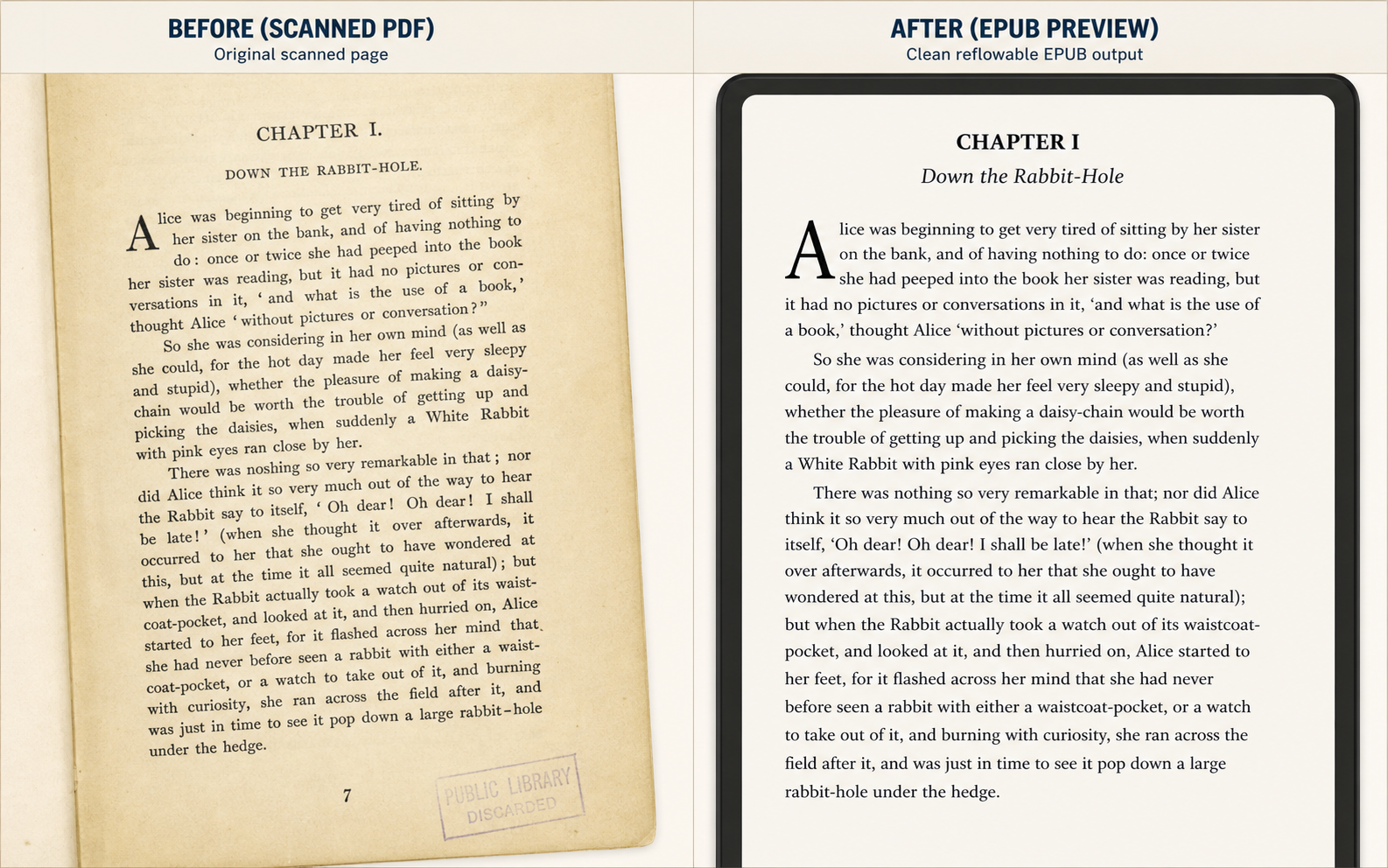
Before and after scanned PDF to EPUB example for a historical novel page, showing a yellowed book scan on the left and a clean reflowable EPUB preview on the right
Historical novel scan to EPUB preview: damaged paper scan on the left, clean reflowable reading view on the right.

Use Case 1

Public-domain book chapters

This is the simplest but highest-volume use case: judge whether a yellowed chapter scan becomes comfortable enough to read on a small e-reader.

  • Page numbers removed
  • Broken lines repaired
  • Reading comfort improved
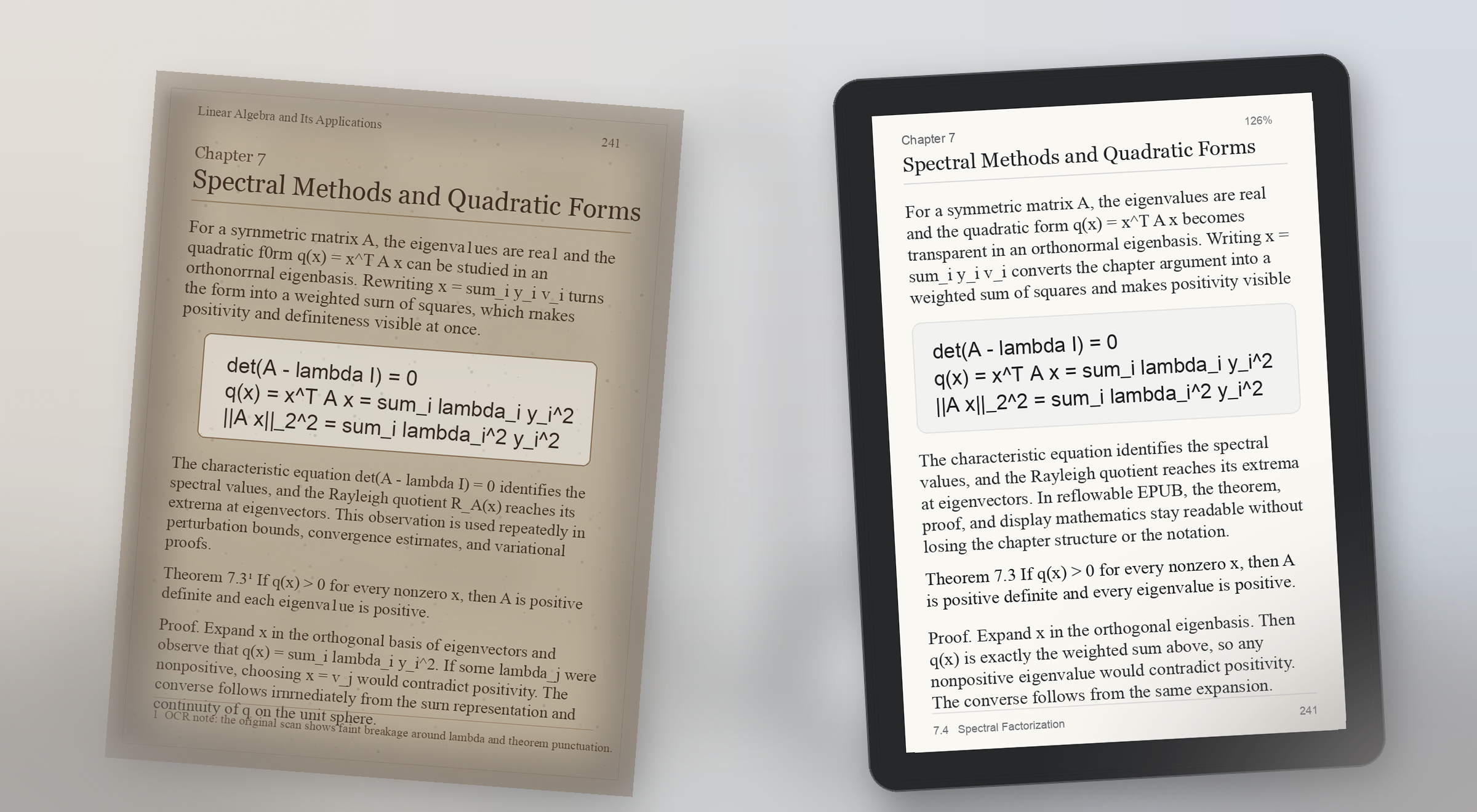
Before and after scanned PDF to EPUB example for a math-heavy textbook page, showing a faded printed page with formulas on the left and a readable EPUB preview with preserved display math on the right
Math-heavy textbook preview: scanned formulas stay visible on the left, and the EPUB proof keeps theorem structure and display math readable on the right.

Use Case 2

Math-heavy textbook PDF to EPUB

Formula pages break trust fast. A useful preview proves that equations, theorem blocks, and surrounding explanation still make sense on a real reading device.

  • Display math preserved
  • Theorem blocks readable
  • Small-screen proof check
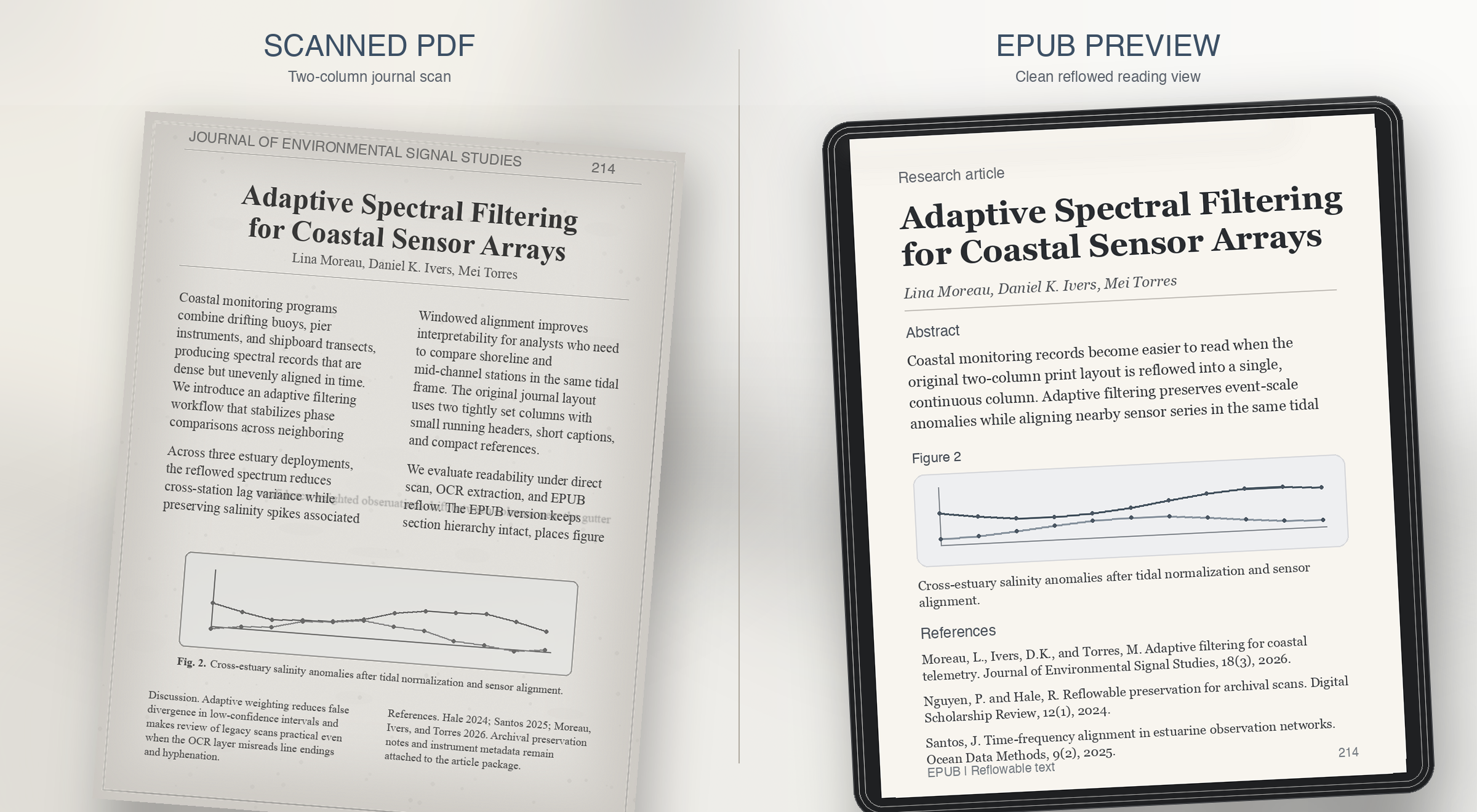
Before and after scanned PDF to EPUB example for a two-column journal article, showing a grayscale academic scan on the left and a clean single-column EPUB preview on the right
Two-column journal preview: dense print on the left, a single readable column with figure captions and references restored on the right.

Use Case 3

Two-column journal article to EPUB

Research journals usually fail on reading order. The preview should prove that columns, captions, and references survive reflow instead of collapsing together.

  • Column order resolved
  • Figure captions restored
  • References kept readable
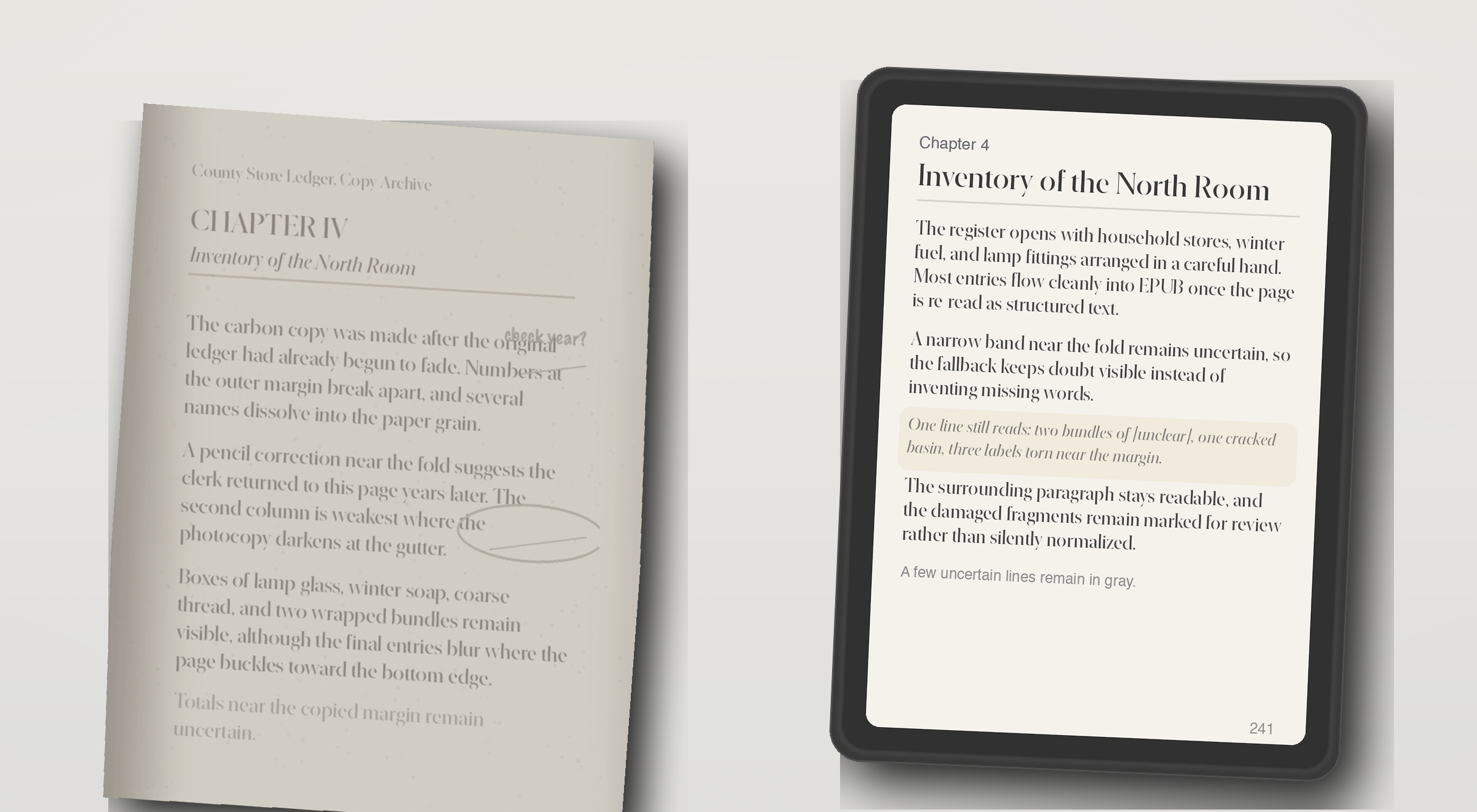
Before and after scanned PDF to EPUB example for an image-only archive scan, showing a faded photocopy on the left and an EPUB preview with partially recovered text on the right
OCR fallback preview: a weak archive photocopy on the left, and recovered but still honest EPUB text on the right.

Use Case 4

Image-only scan with OCR fallback

Some PDFs have no usable text layer at all. The right behavior is not fake confidence, but a preview that shows what OCR recovered and what still needs review.

  • Weak scan recovered
  • Unclear lines still visible
  • Review still required

스캔본 변환기를 믿기 전에 사용자가 묻는 질문들.

What does the live demo check today?

The live checker runs the repo's quality rules against extracted page text. It flags empty OCR output, page-number leaks, broken hyphenation, bad spacing, and formula-structure risk.

Does the current site convert a full scanned PDF into EPUB?

The current demo can generate a preview EPUB directly from an uploaded PDF. Production-grade full-book conversion still needs stronger layout recovery, better OCR repair, EPUB validation, and job orchestration.

Is it safe to test a page from a private book or archive?

In this demo, the PDF is uploaded to the current preview service so it can generate a sample EPUB. Review your deployment and privacy settings before testing private material. The page checker still exists for users who want to inspect extracted text before uploading.

What formats does this workflow aim to support?

The wedge is scanned PDF input, extracted page text for diagnosis, and a reflowable EPUB preview for reading on Kindle- and Kobo-style devices. It is not trying to become a broad everything-to-everything converter.

How accurate does the preview need to be?

Accurate enough to judge reading comfort and obvious structural damage. The preview is meant to answer whether the book feels clean enough to continue, not to replace final editorial review for every edge case.

Can it fix OCR problems automatically?

Some cleanup can be automated, but the product should stay honest about uncertainty. The key promise is to surface where review is needed so the user can decide whether to repair, crop, rerun OCR, or stop.

What happens with math, tables, or damaged layouts?

Those are the pages most likely to trigger risk labels. Formula structure, tabular alignment, footnotes, and badly cropped scans often need targeted repair before an EPUB is truly comfortable to read.

Who is this product for?

Readers and document owners with scanned books, academic PDFs, or public-domain material who want a reflowable EPUB for Kindle or Kobo without proofreading every page manually.

Why not use a generic PDF to EPUB converter?

Generic converters export files, but they rarely explain where OCR or layout recovery failed. This product is designed to show risk before the user commits to a full conversion.

Can I preview a scanned PDF before converting the whole book?

Yes. The main demo flow is designed around that exact question: upload one PDF, inspect the first pages, review OCR risk, and judge whether the full book is worth converting.

What kinds of scanned PDF examples matter most?

The most useful examples are before-and-after comparisons for noisy OCR, math-heavy academic pages, two-column journal layouts, footnotes, captions, and image-only scans that need OCR fallback.

What should a scanned PDF to EPUB preview prove?

It should prove reading comfort, not just file export. A good preview shows whether line breaks, page numbers, formulas, headings, columns, and captions still make sense on a small reading device.

진행하기 전에 페이지를 먼저 보세요.

PDF 업로드나 페이지 점검을 몇 초 안에 시작할 수 있습니다. 데모에는 가입이 필요 없습니다. 저장된 미리보기나 이후 전체 변환이 필요할 때만 원타임 액세스를 사용하세요.

원타임 액세스

한 번 로그인해서 저장된 미리보기와 전체 변환을 여세요.

비밀번호 대신 이메일 원타임 코드를 사용하세요. 전체 변환, 저장된 미리보기 기록, 검토 대기열 안내를 받을 수 있습니다.

비밀번호도, 긴 가입 절차도 없습니다. 이메일 하나, 코드 하나, 세션 하나면 됩니다.

Saved previews

Preview history

Sign in with a one-time code to save previews and reopen them later.